

Appearance
TAK
Your positions on ATAK, iTAK and WinTAK, and your TAK team on the map in MeshSat Android. You have two ways to get there: let the Hub run a TAK server for you, or point it at one you already run.
New
Hosted TAK landed in September 2026. It is tested against OpenTAKServer, including the parts that keep one customer's server away from another's, but it has little field exposure yet. If you are depending on it for something that matters, tell us: we would rather hear about it early.
What goes to TAK, and what comes back
Whichever server you use, the Hub is the one thing that talks to it. Your kits and apps keep the one connection they already have, to the Hub, and need no TAK server address of their own.
Out to TAK
- Every position one of your kits, phones or devices reports to the Hub appears on your TAK server as a marker.
- MeshSat Android (2.19.6 and later) with Enable TAK on sends its own position once a minute, an SOS, a missed check-in and its chat as TAK events. The Hub passes them on to your TAK server and to your other phones running MeshSat Android. A phone that sends its own marker is not drawn a second time from its position report.
Back from TAK
- The Hub reads your TAK server as well. The people connected to it appear on the map in MeshSat Android (2.19.6 and later).
What the Hub does not pass on
- One TAK server's traffic to another TAK server. If you use a hosted server and your own, each sees your kits and phones, and neither sees the other's users through the Hub.
- Anything it cannot check. Every event is read and written out again before it goes on. An event that is malformed, that uses XML namespaces, that is larger than 16 KiB from an app or 64 KiB from a server, or that expired more than five minutes ago is dropped.
The field kit and MeshSat iOS do not send their own TAK events through the Hub yet. Their positions reach TAK as markers, as above.
A TAK server of your own
TAK under Delivery in the menu. Turn it on and the Hub creates an OpenTAKServer that belongs to you alone: its own server, its own database, its own certificate authority. Nobody else's team appears on your map and yours appears on nobody else's.
It is part of every plan, including free. What the plan limits is how many people you can put on it:
| Plan | TAK accounts |
|---|---|
| Free | 4 |
| Crew | 12 |
| Fleet | 40 |
| Custom | 100 |
The first time you enable it the server takes a minute or so to come up. After that it stays.
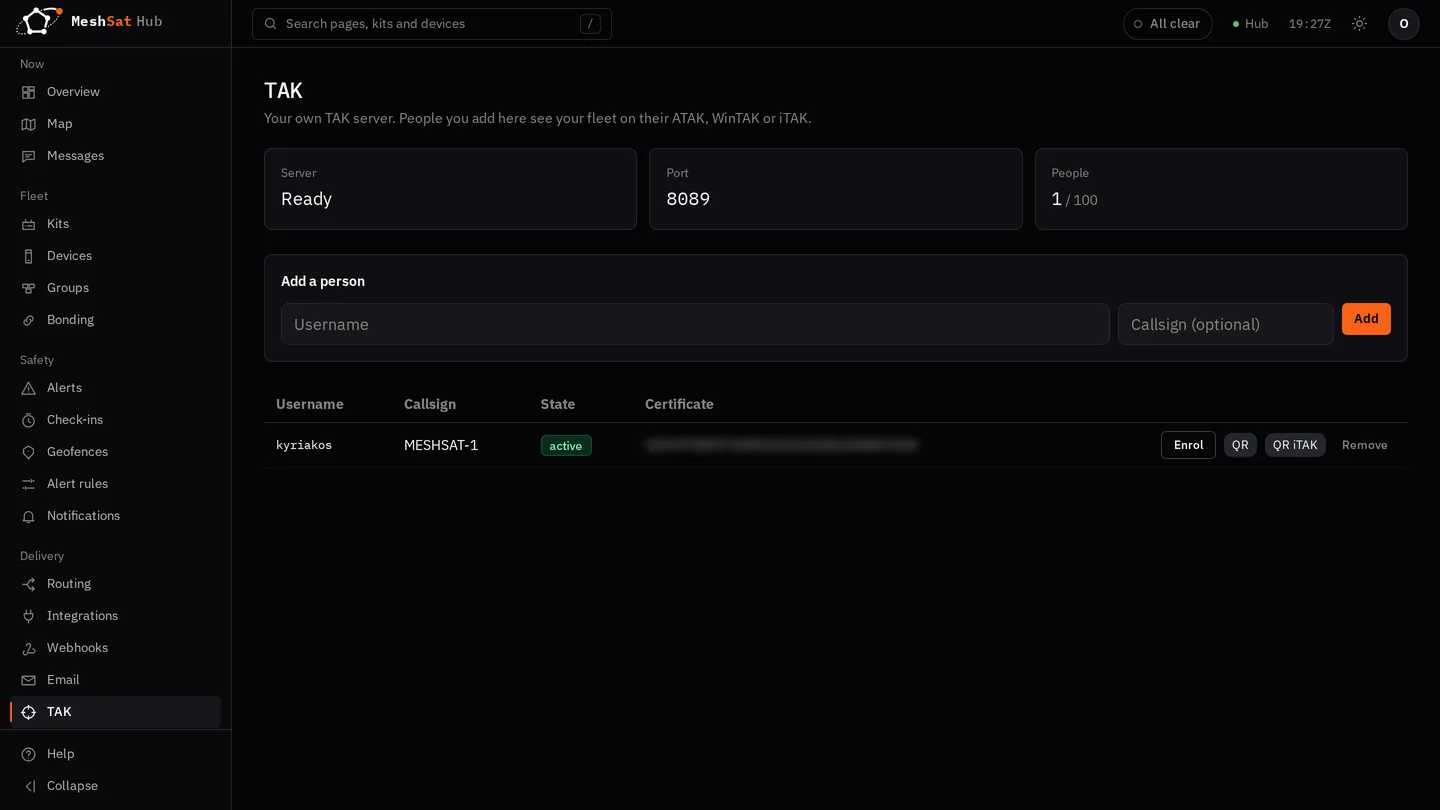
Adding a person
Give them a username. It may only contain lowercase letters and digits (no hyphens, no dots, no @), because the TAK server refuses anything else, so an email address or a hyphenated callsign will not do. The field shows you what the account will actually be called as you type, rather than letting you find out after the fact.
A callsign is optional and is what their team sees on the map.
Getting it onto a phone
Press enrol. You get a link and a QR code, and two things about them matter:
- They are shown once. Close the dialog and the link is gone; mint a new one if you need to.
- They work once, for fifteen minutes. Long enough to walk over to somebody's phone, short enough that a link left in a chat window is useless by the time anyone finds it.
Opening the link on the phone downloads a data package: the connection details, the trust anchors and the phone's own certificate. Import it the way you would any data package. The phone then connects to hub.meshsat.net on port 8089, the standard TAK streaming port.
ATAK and WinTAK take the package as it comes. iTAK needs a different one, because iTAK reads a flat archive with no manifest: add ?client=itak to the end of the enrolment link before opening it on an iPhone or iPad. Importing the ATAK package into iTAK will not work.
If the download fails part way, mint a new enrolment. The link is spent the moment it is used, deliberately, so that a half-delivered package cannot be fetched twice. So there is nothing to retry and nothing is lost by starting again.
The certificate in that package is the phone's identity. Its private key is generated for that one enrolment and the Hub does not keep a copy once the phone has collected it, so a lost phone is dealt with by deleting the account here rather than by changing a password. Deleting it refuses that certificate on the next connection.
What it does not do yet
Said plainly so you do not plan around it:
- Markers from TAK do not appear on the Hub's own map. They reach the map in MeshSat Android (see above), not the map in the Hub console.
- No data packages, files or missions. Those endpoints answer 404.
- Your TAK server's own data is not in your export. Closing your account destroys the server and its database along with everything else, but an export will not contain what was on it.
Or bring your own TAK server
If you already run TAK, you do not have to adopt ours. Add a TAK provider account under Provider accounts with your server's address and port, and the certificate and key the Hub should present to it. The Hub connects out to you; it needs no server of its own and no enrolment, and your phones keep connecting where they already do.
Your server decides whether to trust the Hub, which means the Hub's certificate has to be signed by something your server accepts. If it refuses, the Hub now tells you so in its logs rather than going quietly silent, which is a fault we have had and fixed.
Removing the provider account stops the forwarding. Nothing else about your account changes.