

Appearance
Connect a bridge
A bridge reaches the Hub over MQTT on a WebSocket, and the Hub authenticates it with a client certificate rather than a password. The certificate is the identity: it is signed by the Hub's own bridge CA, and a bridge without one cannot connect no matter what else it presents.
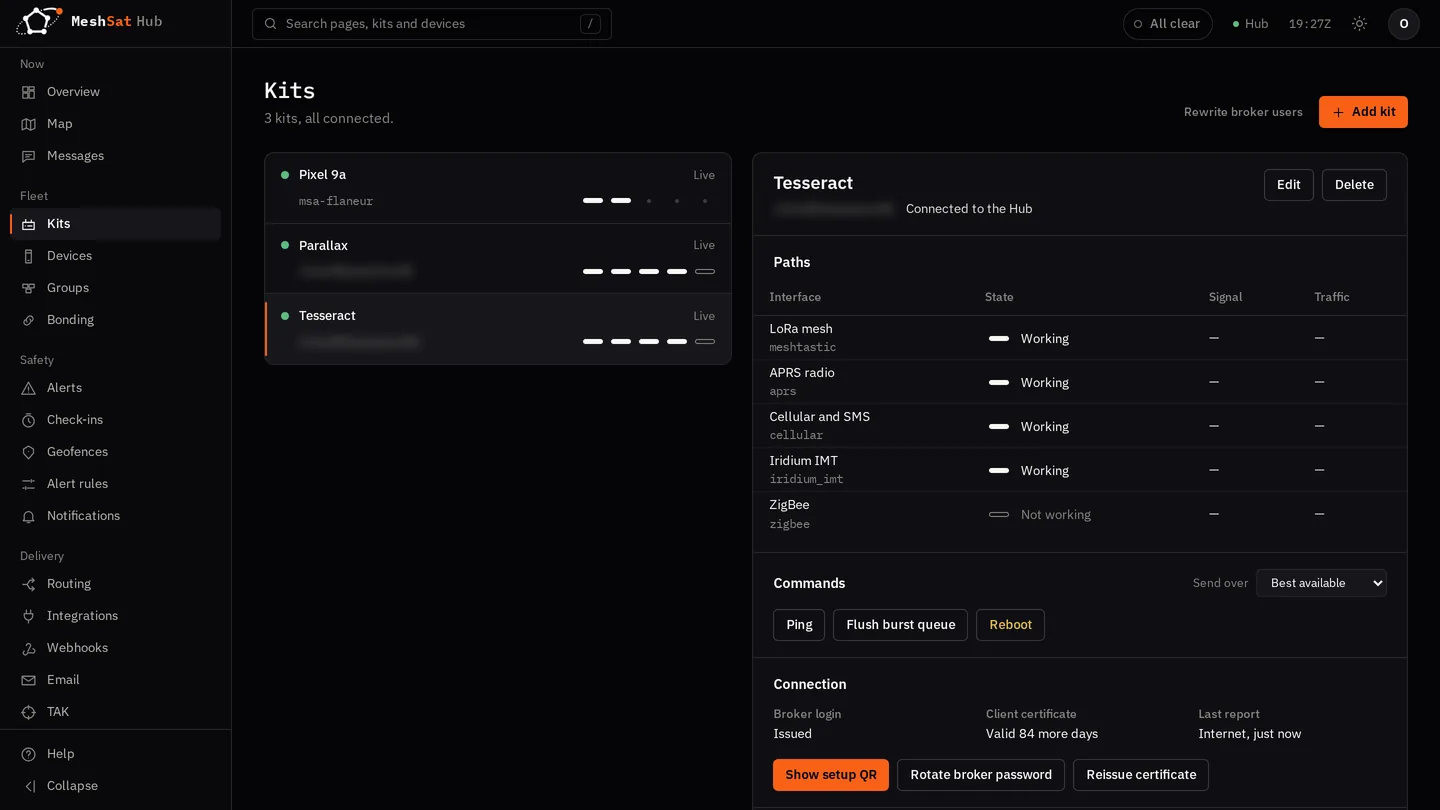
You do this once per bridge. It takes about two minutes. In the Hub a connected bridge is called a kit, and they are listed under Kits.
In the Hub
- Open Kits and choose Add kit. Give it an ID that means something to you; it is the name you will see on the map and in the message log, and it cannot be changed later.
- The new kit opens on the right. Under Connection, either:
- choose Show setup QR and scan the code with the kit or with the MeshSat app on Android or iOS. It carries the address, a broker login and the certificate, and works once, for 30 minutes. Until it is scanned the kit keeps the login it has, so showing a code to a connected kit and closing it changes nothing. The scan replaces the login; the broker takes it up within a minute, and the app keeps retrying by itself until it does; or
- for a bridge you configure by hand, choose Issue broker login and then Issue certificate. You get the username and password, then the certificate, its private key and the Hub's CA certificate. The password and the private key are shown once and never again. Copy them now.
On a phone running MeshSat Android, Setup > Hub > Scan Hub Provision QR is the QR route. See Set up MeshSat Android. On an iPhone running MeshSat iOS, Setup > Hub > Scan the Hub's QR code does the same in the app. The Camera app works too: the meshsat:// link the code carries opens MeshSat iOS, which then names the Hub and the kit and asks you to confirm before it claims the login.
On the bridge
Put the values into the bridge's Hub Connection settings, or into its environment:
| Setting | What goes in it |
|---|---|
MESHSAT_HUB_URL | wss://mqtt-hub.meshsat.net/mqtt |
MESHSAT_BRIDGE_ID | the bridge ID you chose, defaults to the hostname |
MESHSAT_HUB_USERNAME | the username from the Hub, meshsat by default |
MESHSAT_HUB_PASSWORD | the password from the Hub |
MESHSAT_HUB_TLS_CERT | path to the client certificate |
MESHSAT_HUB_TLS_KEY | path to the private key |
MESHSAT_HUB_TLS_CA | path to the CA certificate |
Restart the bridge. It publishes a birth message on connect, and Kits shows it connected within a few seconds.
Do not set the bridge CA as the system trust store
The CA certificate above verifies the bridge to the Hub. It is not for verifying the Hub to the bridge: that is a normal public certificate and the system roots already handle it. Replacing the system roots with the bridge CA stops the bridge trusting the server it is talking to.
Certificates expire
Certificates are issued for 90 days. The kit's page shows how many days are left; choose Reissue certificate there before expiry and replace the files on the bridge; nothing else changes. A bridge whose certificate has expired stops connecting and shows offline.
If it stays offline
- The Hub marks a bridge offline when it has not been heard from for five minutes, so wait that long before assuming a problem.
- Check the bridge can reach
mqtt-hub.meshsat.neton port 443. It is a normal outbound HTTPS connection; no inbound ports need opening. - A certificate signed by a different Hub, or one that has expired, is refused at the broker before MQTT starts. That looks like a TLS error in the bridge log, not an authentication error.
When the internet is not there
A bridge that cannot reach the Hub over the network can fall back to a satellite or SMS bearer for the messages that matter, rather than going silent. This is on by default:
| Setting | Default | What it does |
|---|---|---|
MESHSAT_HUB_SAT_FALLBACK | true | allow falling back to a satellite bearer |
MESHSAT_HUB_FALLBACK_AFTER_MIN | 5 | minutes offline before falling back |
MESHSAT_HUB_FALLBACK_BEARER | auto | which bearer to use |
MESHSAT_HUB_FALLBACK_POSITION_MIN | 15 | minutes between positions while on fallback |
MESHSAT_HUB_FALLBACK_HEALTH_MIN | 60 | minutes between health reports while on fallback |
MESHSAT_HUB_SMS_NUMBER | unset | number to use if the fallback bearer is SMS |
Fallback traffic costs airtime on your own provider account, which is why the position and health intervals are much longer than they are over the network.