

Appearance
Reticulum
Every workspace can have an LXMF address on the Hub's Reticulum node. People using Sideband, CrossTalk, MeshChat, NomadNet or any other LXMF client message it; what arrives is in the inbox on the Reticulum page (under Network), and what you send from there is marked delivered when the other side proves it. An owner creates the address on that page.
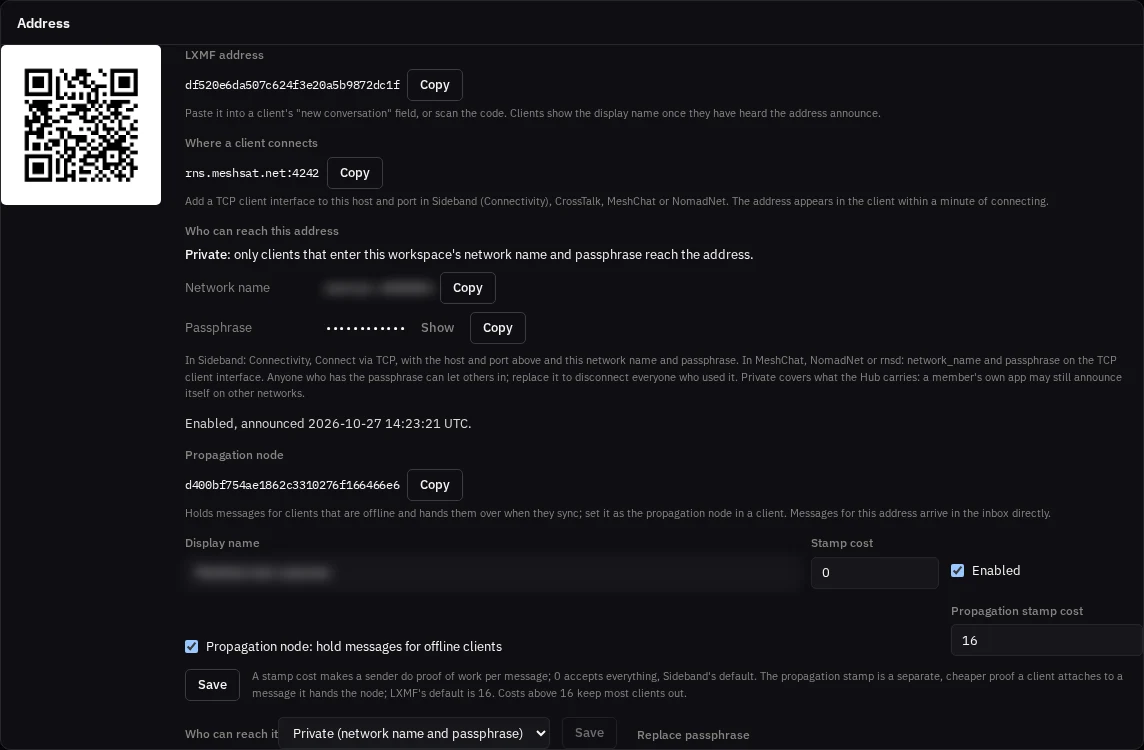
Your address
The address is a Reticulum identity the Hub keeps for your workspace, shown as a 32-character hash with a QR code. Other clients reach it by that hash and show the display name you set once they have heard the address announce. It is announced every 30 minutes and at once after a change.
A stamp cost makes a sender do proof of work for each message. 0 accepts every message, which is Sideband's default; costs above 16 keep most clients out.
Who can reach it
You choose, on the Reticulum page:
| Setting | Who reaches the address |
|---|---|
| Private (the default) | Only clients that enter your workspace's network name and passphrase |
| Public | Anyone on Reticulum, the way anyone can write to an email address |
| Off | Nobody; the address is not announced |
The network name and passphrase are generated by the Hub and shown on the page to owners and operators. Replace passphrase makes new ones and disconnects at once every client that joined with the old ones; everybody you still want in enters the new ones.
What Private covers, and what it does not:
- It covers what the Hub carries. A member's own app may still announce itself on other Reticulum networks it is connected to.
- Anyone who has the passphrase can pass it on. The only way to remove one person is to replace the passphrase for everyone.
- Private is a closed network: from it, your address does not reach public Reticulum destinations through the Hub.
- Your kits join your workspace's Private network by themselves. The Hub hands each kit the network name and passphrase, and the new ones within seconds when you replace them; nobody types them into a kit. The kit connects to
rns.meshsat.netport 4242 the way an app does, and on that link it carries only its own messages: it never connects your workspace's network to its LoRa mesh or its other links. When the address is Public or Off, the kits leave. A kit you delete or lose keeps the passphrase it was given, so replace the passphrase. A kit can be kept out withMESHSAT_HUB_RNS_JOIN=false. A kit takes at most 60 messages a minute on its own address.
Switching from Public to Off stops the Hub serving the address, but a client that heard it while it was Public keeps it in its own cache until that expires.
Connect a client
All clients connect to the same place, rns.meshsat.net port 4242, with a TCP client interface.
Sideband: Connectivity, Connect via TCP. Enter rns.meshsat.net as the host and 4242 as the port. For a Private address, also enter the network name and the passphrase from the Reticulum page.
MeshChat and CrossTalk: Interfaces, Add Interface, TCP Client. Enter rns.meshsat.net and 4242, and for a Private address open IFAC Settings and enter the network name and the passphrase. CrossTalk connects at once; MeshChat asks to be restarted first.
NomadNet, rnsd and anything else that reads a Reticulum config:
ini
[[MeshSat Hub]]
  type = TCPClientInterface
  enabled = yes
  target_host = rns.meshsat.net
  target_port = 4242
  # For a Private address:
  network_name = <network name from the Reticulum page>
  passphrase = <passphrase from the Reticulum page>
Then paste the address into the client's new-conversation field, or scan the QR code. The address appears in the client within a minute of connecting.
The propagation node
Each address comes with a propagation node on the same identity, shown on the page. Set it as the propagation node in a client and it holds messages for that client while it is offline, and hands them over when the client syncs. Messages for your own address arrive in the inbox directly.
What has been tested
Tested on 27 Oct 2026 with the Reticulum and LXMF releases Sideband ships (RNS 1.5.7, LXMF 1.2.1), from outside the Hub through rns.meshsat.net:4242:
- With the network name and passphrase, a client got a path in under half a second and its message was delivered.
- Without them, or with another workspace's, a client got no path.
- Public admitted a client without a code; Off admitted nobody.
- After Replace passphrase, the old code got no path and a client connected with it was disconnected; the new code worked.
The apps, the same day, each with a new identity on a Private network:
- MeshChat 2.4.0 and CrossTalk 2.6.0, their own screens in a browser on Linux (the screens their desktop windows show), and NomadNet 1.4.4 in a terminal: a message to the workspace address over a direct link showed as delivered, with the name the workspace gave its address; the reply sent from the Reticulum page arrived; and with the workspace's propagation node set in the app's settings, a message held there for the app arrived when the app synced.
- Sideband 2.2.0: its own messaging code, run without its screens, did the same and also reached both field kits.
Not tested yet: Sideband's screens on a phone.
Related
- Reticulum on the bridge, and how a kit connects to the Hub's node.
- Your team for who is an owner, operator or viewer.