

Appearance
Satellite
The app sends and receives Iridium SBD messages through the node's RockBLOCK 9603: up to 340 bytes out and 270 bytes in. The modem needs a view of the sky, so "anywhere" means anywhere a satellite can be seen.
Messages wait for the sky
A message you send by satellite goes into a queue and is retried until it goes out. If no satellite is in view, it waits and goes out by itself on a later pass. It is not dropped, and the queue survives a restart of the app. Setup > Advanced > Message queue shows everything waiting, sent or given up.
Home counts the messages on their way, and the satellite line shows an orange dot while one is travelling. In a conversation, a clock means queued and a tick means sent. When you write a satellite message, the compose bar shows its size in bytes and credits before you send.
A message that arrives during any satellite session is stored straight away. In 2.11.1 it could be lost while the app was sending (two were, on 19 September 2026), so update to 2.12.0 or later.
What a message costs
Every session that reaches the satellite network uses at least one credit on your own Rock7 account, and Rock7 counts up to 50 bytes per credit. The app is free; the airtime is yours.
So the app opens a satellite session only when there is something to send, when the modem rings, or when you tap Check Mailbox. It never checks on a timer. After a failed session the modem asks for a pause, and the app waits it out instead of spending attempts: Setup > Satellite then says Held after a failed session with the seconds left.
When is a satellite up?
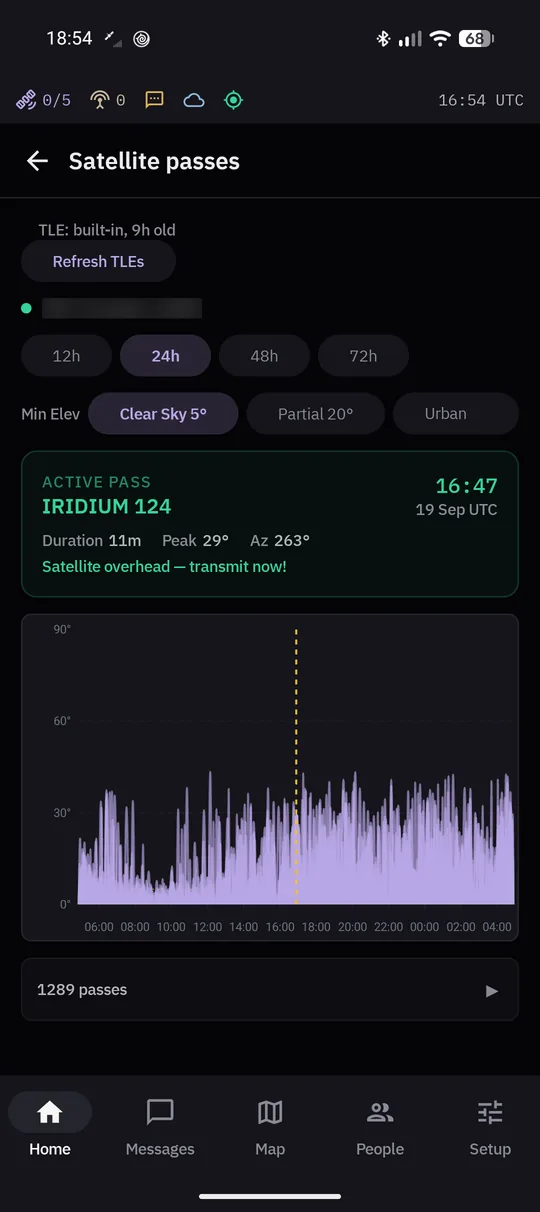 Satellite passes: a satellite overhead now, and the passes over the next day.
Setup > Satellite > Satellite passes predicts the passes over your position for the next 12, 24, 48 or 72 hours. It works with no internet: the orbit data ships inside the app and is refreshed when there is a connection (Refresh TLEs). The minimum elevation presets match where you are: clear sky 5°, partial view 20°, urban 40°.
The signal also shows as an icon in Android's status bar. Zero bars is normal between passes and under a limited view of the sky; the app sends anyway and keeps retrying.
With a RockBLOCK 9704 the bars are the modem's last reading. Once that reading is more than about a minute old, the screen says how old it is ("3/5, last reading 4 min ago"), and before the first reading it shows "?". The bars are only a hint: whether a message went out shows on the message itself.
Where satellite messages land
A message sent by satellite arrives at the satellite provider, which hands it to the MeshSat Hub. The Hub unpacks it and passes it on by its routing rules. A reply typed in the Hub waits at the provider until the app next opens a satellite session.